
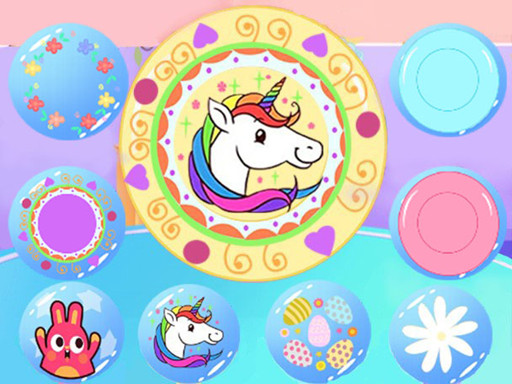
Creative Disc Design and Dress Up
Trusted instant play — no download required.
Reviews
Creative Disc Design and Dress Up is a charming game for kids who love art and dress-up. The design tools are simple yet engaging, allowing children to create colorful discs. The dress-up segment adds a fun fashion element. The outdoor play scene brings everything together, making the experience rewarding and imaginative.
About this game
Game Introduction
Creative Disc Design and Dress Up is a family-friendly game where children help Baby Taylor create a personalized flying disc. The game combines art, fashion, and outdoor fun in a safe environment. Players start by designing a unique disc using bright colors and patterns, then dress Taylor in a sporty tracksuit before heading to the park to play. This game encourages creativity, outdoor activity, and imaginative play, making it perfect for young children who enjoy art and dress-up games.
How to Play
Players begin by selecting a flying disc shape and using simple paint tools to add colors and designs. They can choose from various patterns, stickers, and accessories to customize the disc. After completing the design, players move on to dressing Baby Taylor in a stylish tracksuit by picking different tops, bottoms, and shoes. Finally, they take their creation to a park scene where Taylor can play with her friends. The game is controlled with mouse clicks or taps, making it easy for young children to play.
Game Features
Creative design tools allow children to express themselves freely through disc customization. Dress-up fun lets players mix and match sporty outfits for Taylor. An outdoor play scene brings the design to life, showing the disc in action. Simple controls make the game accessible for young players, with no time limits or pressure. The game blends art and fashion in a positive way, promoting outdoor sports and imaginative play.
Tips for Success
To get the most out of the game, encourage children to experiment with different color combinations and patterns on the disc. Trying various outfit mixes can help create a sporty look that matches the disc design. Taking time to explore all available stickers and accessories can make the disc more unique. Finally, enjoy the park scene to see the creation in action and feel proud of the personalized design.


Player comments
Sign in to leave a review
You must be logged in before posting a rating or comment.
No account? Create one
No comments yet. Be the first to comment!